1 Introduction
In an effort to showcase my SQL skills as well as challenge myself to improve, I picked two challenges from the 8weeksqlchallenge and solved them. Each challenge involves a relational data from a fictitious business/company.
The purpose of this post is to document my effort in solving two (Section 2 & Section 3) challenge data analyses using SQL.
1.1 Analysis methodology
Explore: explore the data schema, tables, views and attributes.
Profile: check for duplicates in the data and distributions/frequencies.
Clean: clean data which involves fixing typos, type casting, treating null values, and adding categorisations.
Shape/Transform: reshape the data in the format needed for analysis, operations like pivot, unpivot, aggregate, transpose, append, etc.
The final step is to anlyse the data, spotting trends, patterns, conclusions, etc.
1.2 Query writing methodology
The first step to answer a question starts with identifying relevant tables and columns. This can done by consulting the table specification in a documentation, by running a SELECT statement or by doing both.
Once relevant tables and attributes are identified, the SQL queries are developed iteratively and incrementally. Always starting with a basic SELECT and building the query incrementally.
The final step is to perform a sanity checks by limiting the data a small the number of rows to ensure that the calculation are correct.
2 Challenge 1: Danny’s Diner
2.1 Overview
The data for this challenge is sales records from a fictitious restaurant. The dataset has three tables:
- sales
- memebers
- menu
and they are related as illustrated in the following Entity Relational Diagram: 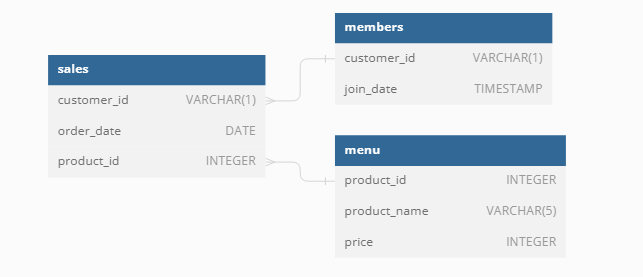
Objective of the challenge is to mine the data for petential areas of business/service improvement that can increase revenue.
2.2 Details
I used Docker to make the analysis easily reproducible by loading two servers:
- MySQL - opensource database server
- CloudBeaver - opensource web-based database editor.
Data is loaded into MySQL at instantiation time automatically.
2.3 Questions and SQL queries
What is the total amount each customer spent at the restaurant?
What was the first item from the menu purchased by each customer?
What is the most purchased item on the menu and how many times was it purchased by all customers?
Which item was purchased first by the customer after they became a member?
Which item was purchased just before the customer became a member?
What is the total items and amount spent for each member before they became a member?
For a detailed description of the challenge check the link.
2.4 Used SQL concepts
A number of SQL concepts were used to answer the questions, often in combinations. Things like * Joins: LEFT JOIN, RIGHT JOIN, INNER JOIN * Keywords: DISTINCT * Functions: GROUP_CONCAT() , DATEDIFF(), FIRST_VALUE() * Common Table Expressions (CTE) * Expressions: CASE
2.5 Conclusions
SQL syntax simplifies the data manipulation and analysis signficantly. Having an understanding of the main concepts made learning the syntax and googling for a solution when stuck much easier.
3 Challenge 2: Pizza Runner
3.1 Overview
The data for this challenge is more challenging as it requires some cleaning as you shall see. It is customer orders and delivery records from a fictitious Pizza restaurant. The dataset has six tables:
- runner_orders
- runners
- customer_orders
- pizza_names
- pizza_recipes
- pizza_toppings
and they are related as illustrated in the following Entity Relational Diagram: 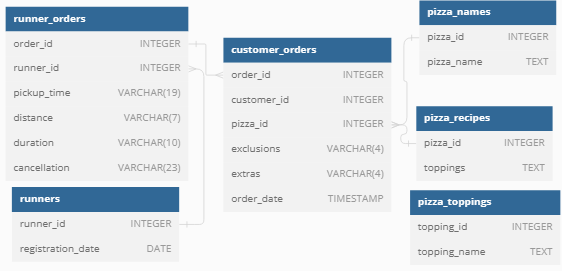
Objective is also to mine the data for petential areas of business/service improvement that can potentially increase revenue.
3.2 Details
I used Docker to make the analysis easily reproducible by loading two servers:
- MySQL - opensource database server
- CloudBeaver - opensource web-based database editor.
Data is loaded into MySQL at instantiation time automatically.
3.3 Data cleaning
Initial investigations of the tables revealed that the data required some cleaning to make it suitable for the required analyses.
I have created three new views to that contain cleaned up versions of three tables (runner_orders, customer_orders, pizza_recipes):
3.4 Questions and SQL queries
3.4.1 Pizza Metrics
How many Vegetarian and Meatlovers were ordered by each customer?
What was the maximum number of pizzas delivered in a single order?
For each customer, how many delivered pizzas had at least 1 change and how many had no changes?
How many pizzas were delivered that had both exclusions and extras?
What was the total volume of pizzas ordered for each hour of the day?
3.4.2 Runner and Customer Experience
3.4.3 Ingredient Optimization
- What are the standard ingredients for each pizza?
- What was the most commonly added extra?
- What was the most common exclusion?
- Generate an order item for each record in the customers_orders table in the format of one of the following:
- Meat Lovers
- Meat Lovers - Exclude Beef
- Meat Lovers - Extra Bacon
- Meat Lovers - Exclude Cheese, Bacon - Extra Mushroom, Peppers
- Generate an alphabetically ordered comma separated ingredient list for each pizza order from the customer_orders table and add a 2x in front of any relevant ingredients
- For example: “Meat Lovers: 2xBacon, Beef, … , Salami”
3.4.4 Pricing and Ratings
What if there was an additional $1 charge for any pizza extras? For example, add cheese is $1 extra
-
- customer_id
- order_id
- runner_id
- rating
- order_time
- pickup_time
- Time between order and pickup
- Delivery duration
- Average speed
- Total number of pizzas
3.4.5 Bonus question
For a detailed description of the challenge check the link.
3.5 Used SQL concepts
A number of SQL concepts were used to answer the questions, often in combinations. Things like * Concept: Subqueries, CTE, Views, Union * Joins: LEFT * Keywords: DISTINCT * Functions: IF(), HOUR, WEEKDAY(),DAYNAME(), DAYOFYEAR, TIMEDIFF(), DATE_ADD * Expressions: CASE, ALTER TABLE, DROP TABLE, CREATE TABLE, INSER INTO, UPDATE
3.6 Conclusions
SQL is a joy to work with for especially when the data is relational and whenever the volume of data big that it doesn’t fit in local memory. Having said, I find it still compelling to use SQL even with the data can fit in local memory.